OpenToonz: AutoInbetween

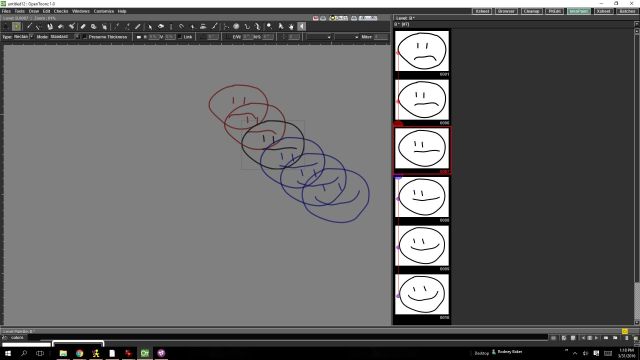
My first test of the AutoInbetween feature.

With one frame inbetween:
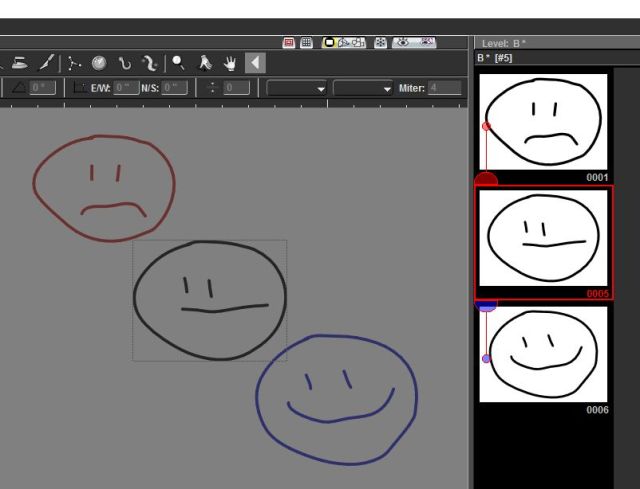
AutoInbetweenTest


With multiple frames inbetween:Autoinbetween more inbetweens


Posted in Uncategorized | Leave a comment

OpenToonz: Working around GTS (Haven’t got Scanning directly into the program working yet)

Here’s a drawn sequence that I was using to test the scanning software called GTS that accompanies OpenToonz.  I still haven’t got that to work yet but that isn’t essential because the images can be scanned in outside of the program and then imported (drag/dropped) into the xsheet.

I like that the xsheet is so central to OpenToonz.  It makes quick work of retiming sequences.


ToonzCatwalk

Posted in Uncategorized | Leave a comment

OpenToonz: Adding FX (Blurs, Merges, etc. etc.)

OpenToonz-AddingFXSomeone asked about blending drawings and such.

As with most things there are multiple approaches.

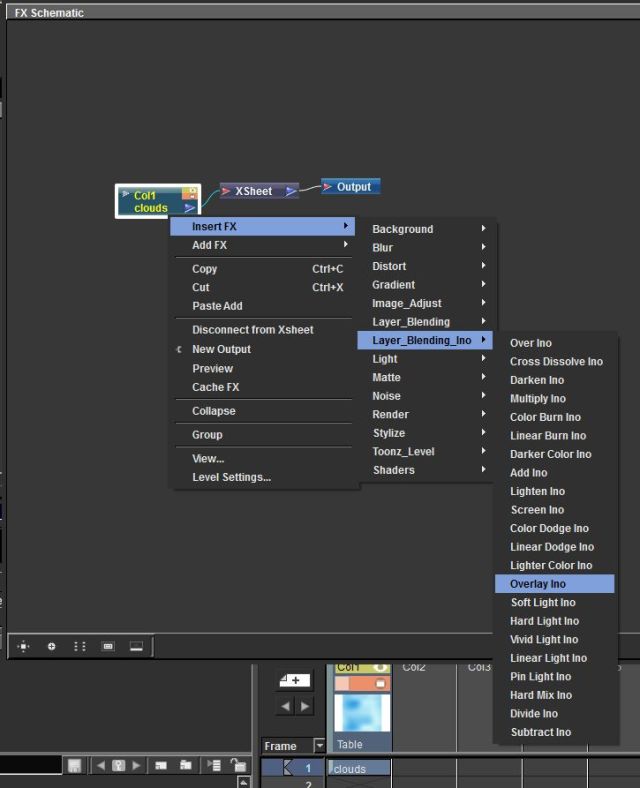
Here’s a video outlining the process when in the Schematic view.

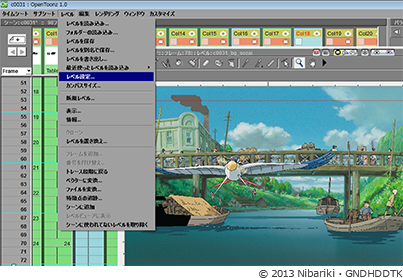
The other way (perhaps more straightforward but accomplishing the same thing as it results in the FX being added to the Schematic flow) would be to Right Click on the Column you want to add the effect to in the Xsheet and select ‘New FX’


Posted in Uncategorized | Leave a comment

OpenToonz: Schematic / FX

FX Schematic

Posted in Uncategorized | Leave a comment

OpenToonz: Creating New Frames, Onion Skin and Rendering Tips

b4c1b-function_img04

Random screen capture

From Kibate Kaito (and the OpenToonz Users Forum comes the following tips:
Creating New Frames
In the “PltEdit” Mode, you can see the frames of your scene. Try drawing in the image and you will see the first frame is automatically being created. If you click on the second frame and then draw on that one, it will create automatically a new frame in that one as well. There are some other tools as well, but this is the basic, just look around.
Onion Skin
As for onion skin, it exist. In that window where you draw on to, right click on it. It says there “Active Onion Skin”, it will create a transparent look at the last 3 frames. Unfortunately i haven’t been able to work out if it can create transparent following frames as well, or any way to increase or decrease the number of frames that are being shown
Rendering
(OpenToonz) renders the background black if you save it as a file format that doesn’t support the alpha channel. Meaning with no backgrounds set, it will be black(thus if you only have black lineart in it, it will appear empty) if you use a file format that supports alpha(like .png) the bg will be transparent.
There are 2 ways to add background. First, the improvised method. Just add another layer at the bottom(or in this background at the far left of the timeline) and add a white rectangle(or whatever color you want).
There is also a proper way to add backgrounds: Under “windows” at the top bar, click on “other windows” then on “Schematic”. The Schemativ window is used to add effects, customization and other features to layers/camera/etc. At the bottom right is a little icon that looks like 2 windows overlayed with each other, called “Toggle FX/Stage schematics”, click on that.
First a bit of explanation. The individual layers are connected to Xsheet, which is similar to a “paper”, while the Xsheet is connected to “Output” which is the final merge of everything. Right click on an empty space in that window and you can see a “Add FX” under that is a “Background” and under that click on “Color Card”. Now you have a background. If you double click on the new effect, you can modify the backgrounds color. It won’t appear in the worksheet, but it will appear in the preview render window.
Thanks Kaitosan!
And here’s a link to the users forum on Google Groups:
Posted in Uncategorized | 2 Comments

OpenToonz: How to Draw (Basic Tutorial)


From Bonnien360 comes this video on basic usage of OpenToonz:


Thanks!

Posted in Uncategorized | 2 Comments

OpenToonz: Customizing the User Interface

This is a little bit of ‘cart before the horse’ but this video has some very useful information on customizing the OpenToonz software.


Thanks Simon!

Posted in Uncategorized | Tagged , , | Leave a comment

OpenToonz software

OPENTOONZ 1.0 has been released

Toonz

I’m going to attempt to post some useful links to the recently released Toonz software.

More information will be posted as I encounter new information and resources related to this software.

This is where you’ll need to go to get it:

https://opentoonz.github.io/

While the learning curve may intially be a little steep, I am of the opinion that as an ‘animator’ you will want this software.


So get to it!


Posted in Uncategorized | Leave a comment

The Dragon’s Lair Project is now on Indiegogo

Dragon’s Lair: The Movie – Indiegogo Video from Don Bluth on Vimeo.

For those interested or that have invested in the kickstarter…

Don and Gary cancelled their kickstarter project and moved the entire fundraising endeavor over to Indiegogo.

https://www.indiegogo.com/projects/dragon-s-lair-returns/x/9070129#/


Posted in Uncategorized | Leave a comment

Don Bluth Kickstarter (Dragon’s Lair)

There are still 9 days left to join the kickstarter Don Bluth and Gary Goldman are using to launch their effort to get back into the traditional animation game (pun intended!).

Kickstarter

While the project is a great one… the rewards are well worth the effort to support the project too!

Click on the image above or This Link.


Note that this fundraiser was canx and a new one is said to be pending via indigogo.  

Posted in Uncategorized | Leave a comment